

For IT and security teams. How Notate for Intune connects to Microsoft Intune, Microsoft 365 and your network, and what data moves where. This describes the current production architecture.
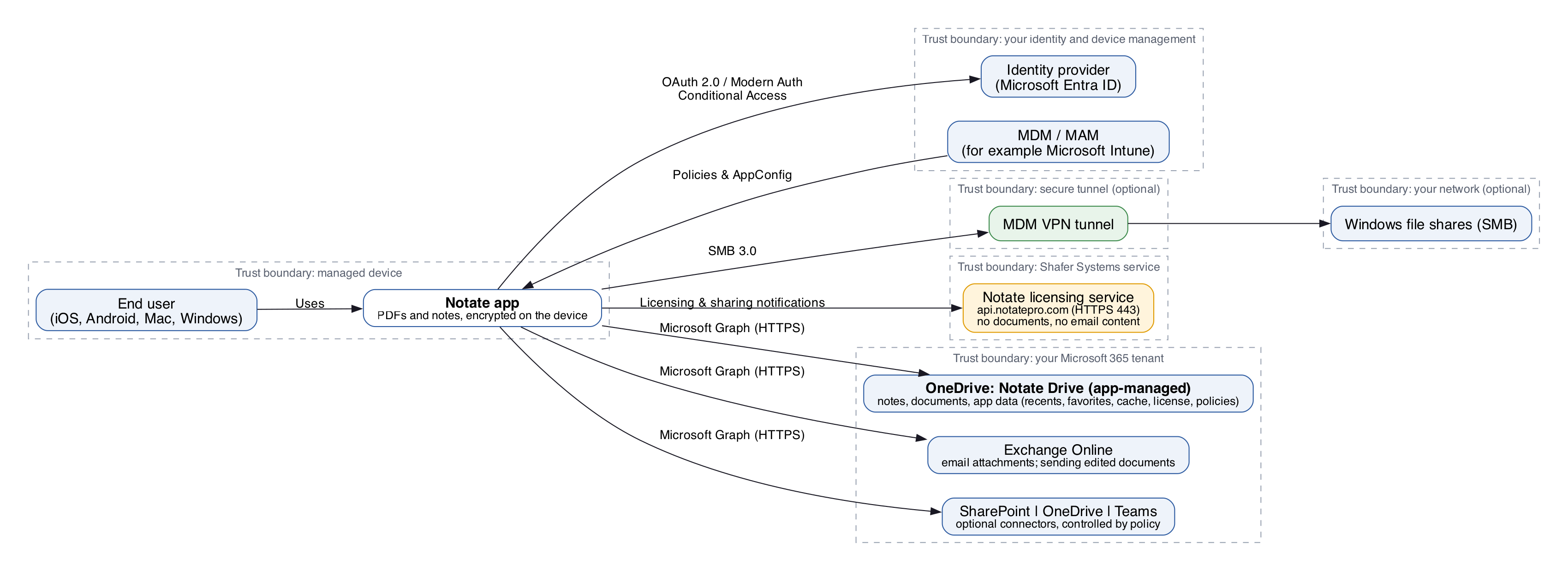
Notate 2026 when deployed against Microsoft 365
-
Notes and documents live in OneDrive. Notate used to keep each user's notes and documents in their Exchange mailbox, reached through Exchange Web Services (EWS). Notate now keeps them in the user's own OneDrive, in a folder named "Notate Drive (app-managed)", reached through Microsoft Graph. Your OneDrive versioning, retention, data loss prevention, eDiscovery and audit policies apply to them automatically. See Notate Drive and OneDrive.
-
Email uses Microsoft Graph. Notate opens email attachments and sends edited documents through Microsoft Graph instead of EWS.
-
Optional AI in your own tenant. Notate can use Azure OpenAI running in your own Microsoft Foundry. It is off unless you turn it on.
Everything else is unchanged. The full list of permissions Notate requests is on Prerequisites and Microsoft Entra ID permissions.
Components
In your network (optional)
|
Component |
Role |
|---|---|
|
Windows file shares (SMB) |
Reached through the Intune VPN tunnel. Notate uses the latest SMB 3.0 over the tunnel to open and save files. |
Microsoft cloud services
|
Service |
Role |
|---|---|
|
Microsoft Intune |
Device management, app configuration and policy delivery. Intune sends all Notate app policy settings to the app. |
|
OneDrive (Notate Drive) |
Stores the user's notes and documents, and Notate's app data (recents, cache, favorites, settings) in a |
|
Exchange Online |
Opens email attachments for editing and sends edited documents. Notate uses MSAL and Microsoft Graph. |
|
OneDrive, SharePoint, Teams file access |
Optional connectors to the user's other files. Each can be turned off by Intune policy. |
Shafer Systems service
|
Service |
Role |
|---|---|
|
Notate licensing and sharing notification server, |
License activation and notifications for shared folders. No document content and nothing that identifies a user is sent: only opaque tokens and device and app metadata. See Notate Sharing Architecture. |
Connection path
Device → MSAL OAuth → Microsoft Graph (OneDrive, Exchange Online, SharePoint, Teams) → optionally the Intune VPN tunnel → your file shares over SMB
Data flows by feature
|
Feature |
Path |
|---|---|
|
Notes and documents |
Notate → MSAL OAuth → Microsoft Graph → the user's OneDrive (Notate Drive) |
|
Moving existing notes and documents from Exchange (one time) |
Notate → EWS → the user's Exchange mailbox, then → Microsoft Graph → OneDrive. Only when the policy is set to migrate. See Step 2: Move Notate Drive to OneDrive. |
|
Email attachments |
Notate → Microsoft Graph → Exchange Online |
|
Files on your network |
Notate → Intune VPN tunnel → SMB server |
|
Cloud files (if turned on) |
Notate → Microsoft Graph → OneDrive, Teams, SharePoint; Notate → ShareFile |
|
Licensing and sharing notifications |
Notate → api.notatepro.com (no personal data, no documents, no email content) |
App registrations in Microsoft Entra ID
|
Application |
Application ID |
Notes |
|---|---|---|
|
Notate |
|
The same ID for iOS, Android, Mac and Windows. Permissions are listed on Prerequisites and Microsoft Entra ID permissions. |
|
Notate for Intune |
|
Needed for Intune deployments. Add it as an enterprise application. Delegated permission: Microsoft Mobile Application Management. |
All cloud connectors can be turned off by policy in Intune or your MDM.
If your organization adopted SharePoint Embedded with Notate, its storage path and permissions are described in Notate and SharePoint Embedded.