

For IT and security teams. How Notate lets users share notebooks and folders with colleagues, and why the Notate sharing service never holds documents or anything that identifies a user.
Goals
-
Users can share notes, tasks and documents with colleagues.
-
Shared content stays secure.
-
Access to shared content is controlled by Exchange's own access control lists (ACLs).
-
Shared content is backed up under your normal Exchange policies.
The problem sharing has to solve
Exchange lets a user share a folder with other users and controls access with its own ACL. A user who knows a folder's ID can read and write it if the ACL allows. But a user can only browse to find that ID if they can also read the parent folder.
Giving colleagues read access to the parent folder would expose too much. A user may want to share one notebook without letting anyone read all their notes.
How Notate solves it
-
The shared content stays in Exchange, protected by the Exchange ACL.
-
Only the job of telling a colleague which folder ID was shared with them moves to the Notate sharing notification server, which runs over HTTPS on the internet.
-
The server stores folder IDs and irreversible hashes of email addresses. It never receives an email address, a name or any document content.
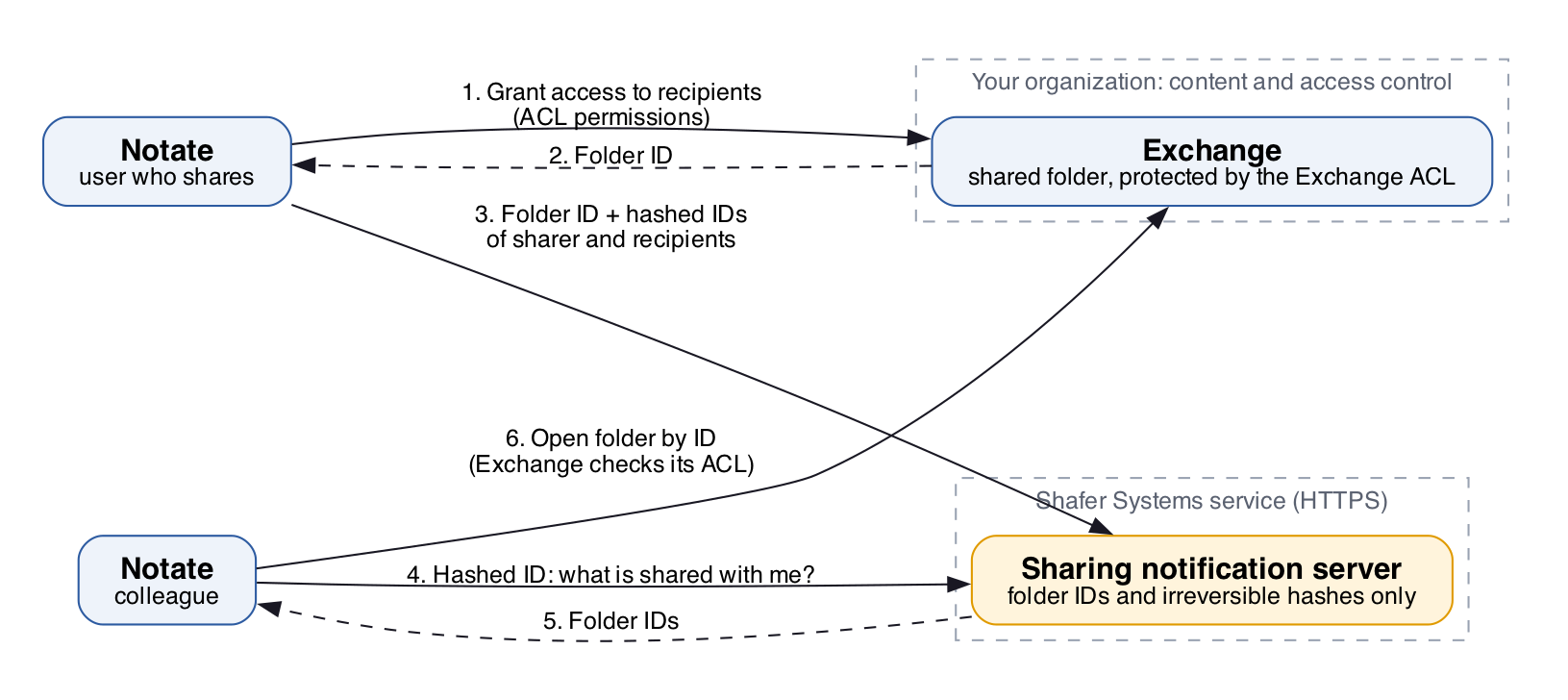
Sharing a folder
-
The user chooses to share a folder. Notate sends Exchange the list of recipients and their permissions, through your MDM's secure connection.
-
If Exchange grants the share, it applies the permissions and returns the folder's ID.
-
Notate sends the sharing notification server: the app ID and app secret, the folder ID, an irreversible hash of the sharer's ID, and irreversible hashes of the recipients' IDs.
Example of what is sent:
X-Notate-Exchange-Application:  com.shafersystems.Notate-for-Good
X-Notate-Exchange-Authorization:  8538b922-29fc-4214-8efd-13943e7b18bf
Folder_id:  34834948294782
Owner:      d1798039-edcd-49ee-a447-ebbb09974f3f
Recipient:  d1798039-edcd-49ee-a447-ebbb09974f3f
Opening a shared folder
-
When Notate starts, it sends the server the app ID, its authorization and the hashed ID of the user.
-
The server returns the IDs of folders shared with that user, with the hashed IDs of the sharer and recipients.
-
Notate asks Exchange for each folder by its ID. Exchange returns the contents only if its ACL grants this user access.
-
Notate shows the folder to the user.
Example of what is sent and returned:
Sent:
X-Notate-Exchange-Application:  com.shafersystems.Notate-for-Good
X-Notate-Exchange-Authorization:  8538b922-29fc-4214-8efd-13943e7b18bf
Recipient:  d1798039-edcd-49ee-a447-ebbb09974f3f

Returned:
Folder_id:    34834948294782
Shared_by:    d1798039-edcd-49ee-a447-ebbb09974f3f
Shared_with:  d1798039-edcd-49ee-a447-ebbb09974f3f
Pending:      false
No data that identifies a user is sent to or from the server. The server holds only hashes it cannot reverse, so even its own records cannot be used to find out who shared what with whom.
Sharing can be turned off by policy. See Notate MDM application policy configuration (Notate 2026).