

For IT, security and architecture teams. The solution architecture of Notate deployed through Microsoft Intune: its components, where data lives, how it connects to your systems, and how it meets security, recovery and AI-governance requirements.
|
Product |
Notate PDF (iOS, Android, Mac and Windows) |
|---|---|
|
Deployment |
Notate for Intune |
|
Vendor |
Shafer Systems LLC |
Overview
Notate is a mobile and desktop document app for viewing, editing, annotating and signing PDF and Office documents in managed environments. All data stays under your organization's control, enforced through Microsoft Intune.
A typical use: an attorney opens a PDF from an Exchange email, marks it up in Notate, and sends back only the marked-up pages in a reply.
Notate is built for regulated and security-sensitive organizations. It does not use consumer cloud storage. It works directly with your systems of record: Exchange, OneDrive, SharePoint and Teams. It is deployed through an enterprise mobility management platform such as Intune and does not work without your organization's configuration.
iOS and Android use the same backend integrations, identity model and policy enforcement, so a mixed fleet does not need two architectures. The design centers on:
-
Your organization owns the data.
-
Access is secure and controlled by policy.
-
Users can work offline without putting data in a third-party cloud.
-
Direct integration with Microsoft 365.
Architecture
Managed iOS and Android apps are deployed through Intune. Users sign in with Microsoft Entra ID using modern authentication. All access to your data goes over secure connections to Microsoft 365 and your file repositories. Intune app protection and configuration policies control what the app can do. A licensing service hosted by Shafer Systems is used only for licensing and sharing notifications and never processes document data.
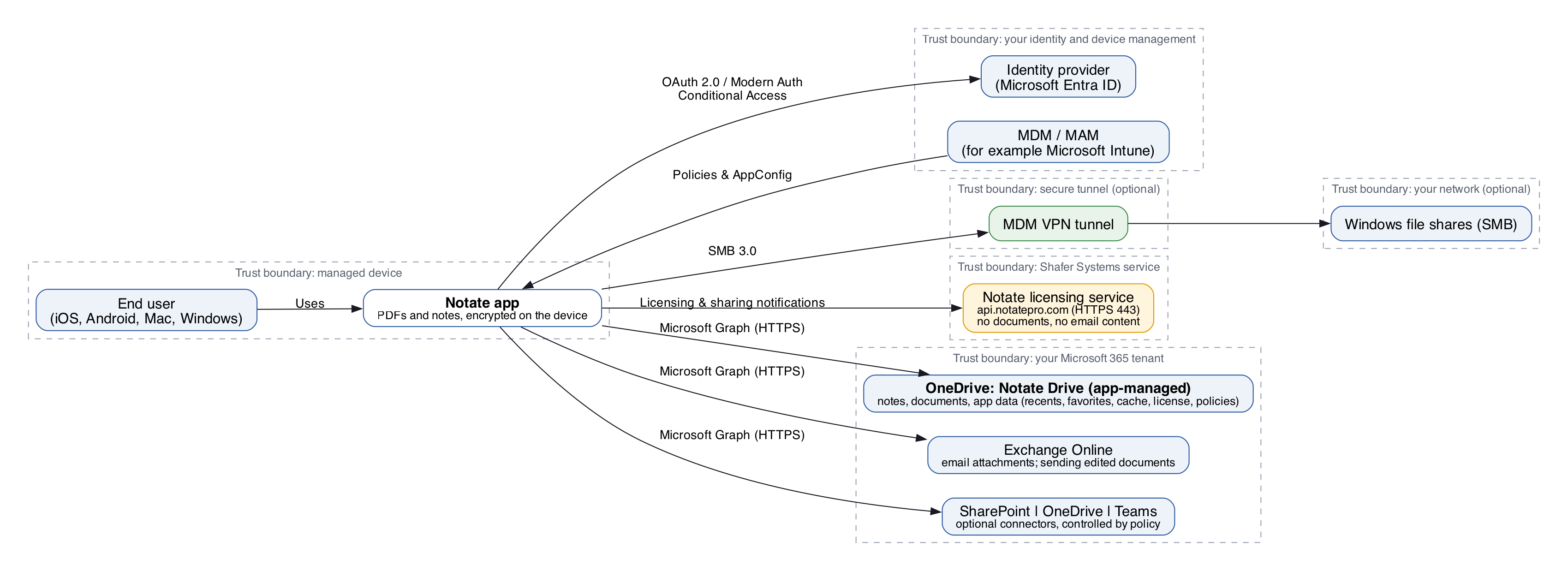
Connection details for each feature are in Notate for Intune Data Flow.
System interfaces
|
Source |
Target |
Purpose |
|---|---|---|
|
Exchange Online |
Notate |
Open PDFs and documents attached to emails. |
|
Notate |
Exchange Online |
Send and reply with edited documents. |
|
Notate |
OneDrive (Notate Drive) |
Save notes, documents and app data (recents, favorites, cache, license, app policies). |
|
Notate |
OneDrive, SharePoint, Teams |
Open and save the user's other documents and notes (optional, controlled by policy). |
Data
Notate reads and writes the same data in each system. It works only with repositories the user already has delegated access to.
|
System |
Data |
Purpose |
|---|---|---|
|
OneDrive (Notate Drive) |
Notes and documents |
Notate's editors save notes and documents to the user's Notate Drive folder. |
|
SharePoint (Microsoft 365) |
Notes and documents |
Notate's editors open and save documents in repositories the user has access to. |
|
OneDrive (Microsoft 365) |
Notes and documents |
Notate's editors open and save documents in the user's OneDrive. |
User interfaces
|
Interface |
Users |
Purpose |
Security |
|---|---|---|---|
|
iOS app |
End users, for example attorneys and support staff |
PDF markup, annotation and editing |
Single sign-on with Microsoft Entra ID; modern authentication (OAuth 2.0) to Microsoft 365 |
|
Android app |
End users, for example attorneys and support staff |
PDF markup, annotation and editing |
Single sign-on with Microsoft Entra ID; modern authentication (OAuth 2.0) to Microsoft 365 |
|
Notate Desktop (browser, Windows and Mac) |
End users |
The same features on a computer; runs locally in the browser |
Single sign-on with Microsoft Entra ID; license and policies read from the user's Notate Drive |
Requirements
-
Administrator consent for Microsoft Mobile Application Management, which lets Notate register itself as an Intune-managed app.
-
Before users can connect to Microsoft 365, an administrator grants Notate its permissions for the organization. The simplest way: open Notate on a device, sign in with the administrator account, and accept the permissions request. See Prerequisites and Microsoft Entra ID permissions.
Security
All data is encrypted and stays in your organization's environment, with no reliance on third-party cloud storage. Notate supports Intune app protection and Conditional Access policies, which suits regulated industries with strict data governance.
Notate uses Microsoft Entra ID for authentication and OAuth 2.0 for Microsoft 365. Your organization controls authentication and authorization, and an administrator must consent before users can reach your services. More in Notate Security Overview.
Monitoring, backup and disaster recovery
Notate's data is stored in your Microsoft 365 OneDrive, SharePoint and Exchange. Retention, backup and access control follow the policies you have set on those repositories.
AI disclosure
|
Question |
Answer |
|---|---|
|
Does Notate include AI features? |
Yes: generative AI and document summarization. AI is optional, controlled by policy, and uses only AI resources your organization provides in its own Azure tenant. |
|
Which AI services are used? |
Microsoft Azure OpenAI, when turned on. |
|
What data does the AI process? |
The document currently open in Notate. |
|
What does the AI produce? |
Changes to documents the user edits with AI turned on. |
|
Known risks |
AI output can be inaccurate and needs human review. |
|
Governance platform |
Microsoft Foundry. |
|
Where does the data go? |
It stays in your own Azure tenant. |
What the AI features do
|
Feature |
Purpose |
|---|---|
|
Meeting recording and notes |
Turns meeting recordings into transcripts or structured notes with summaries, decisions and action items. |
|
Document understanding |
Summarizes documents, answers questions about them, and finds relevant pages or sections. |
|
Markup and comments |
Highlights specified content and adds comments or sticky notes as the user directs. |
|
Sensitive information |
Finds potentially sensitive information and marks proposed redactions for the user to review. The user applies redactions. |
|
Document creation |
Drafts documents such as invoices, cover letters and status reports, including tables, from the user's instructions. |
|
Forms and signing |
Finds the relevant fields and helps fill and sign forms. The user must confirm before a signature is placed. |
|
Visual review and transcription |
Reviews page appearance and converts handwriting into typed text. |
|
Document finalization |
Flattens documents on request, with a warning first that flattening is permanent. |
|
Undoing changes |
Saves a checkpoint before each AI change so the user can undo it or restore an earlier version. Applied redactions and flattening cannot be undone, and users are told so first. |
How to set up AI: Notate AI features: setup on your own Azure OpenAI resource.